Click on a question to see the answer.
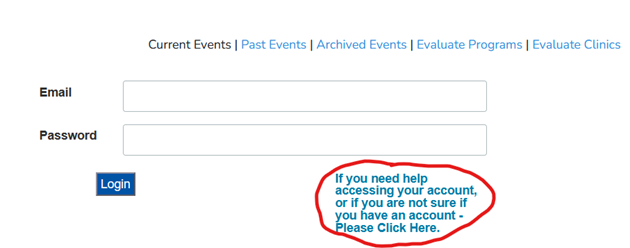
Select “Dashboard” or “Update Your Information” on the menu to access the login page. Click the link below the login, then enter the email/s you may have created an account with. If the email is associated with an account, you may reset your password, while if the email does not match you will be prompted to create a new account.
Email SCAETC_ECHO_DataManager@salud.unm.edu
with your name, previous email, and desired new email. The data manager will manually reset
your email and assign you a temporary password. Then you can log in and reset your password
as above.
-
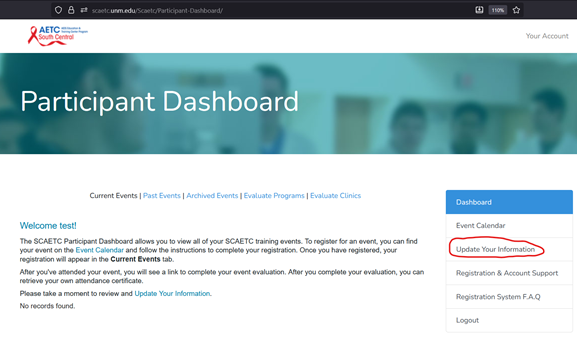
Select “Update Your Information” on the menu and log in
-
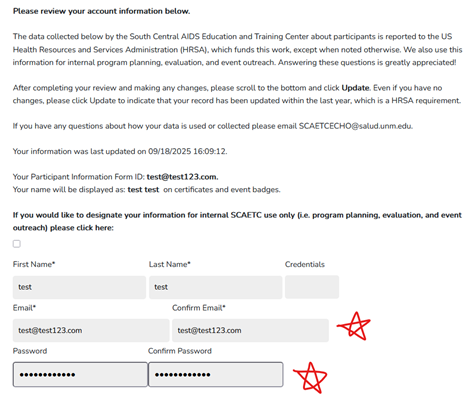
Scroll down and edit your email and/or password
-
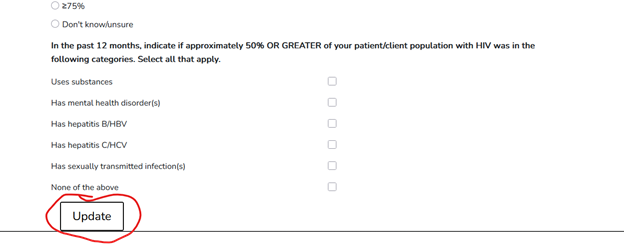
Update any other fields, then be sure to scroll to
the bottom of the page and click “Update”
You may be already registered for this event. Log in to
your participant dashboard
(https://scaetc.unm.edu/Scaetc/Participant-Dashboard/)
to see a list of your upcoming events.
Please 1) close and reopen your web browser, or 2) open the
page in a different web browser (Firefox or Chrome are
recommended). If you have additional questions or issues
please email SCAETC_ECHO_DataManager@salud.unm.edu
and/or the contact email for the event.